SmartB Invoice Form
This page demonstrates the SmartB invoice creation interface.
Invoice Form Overview
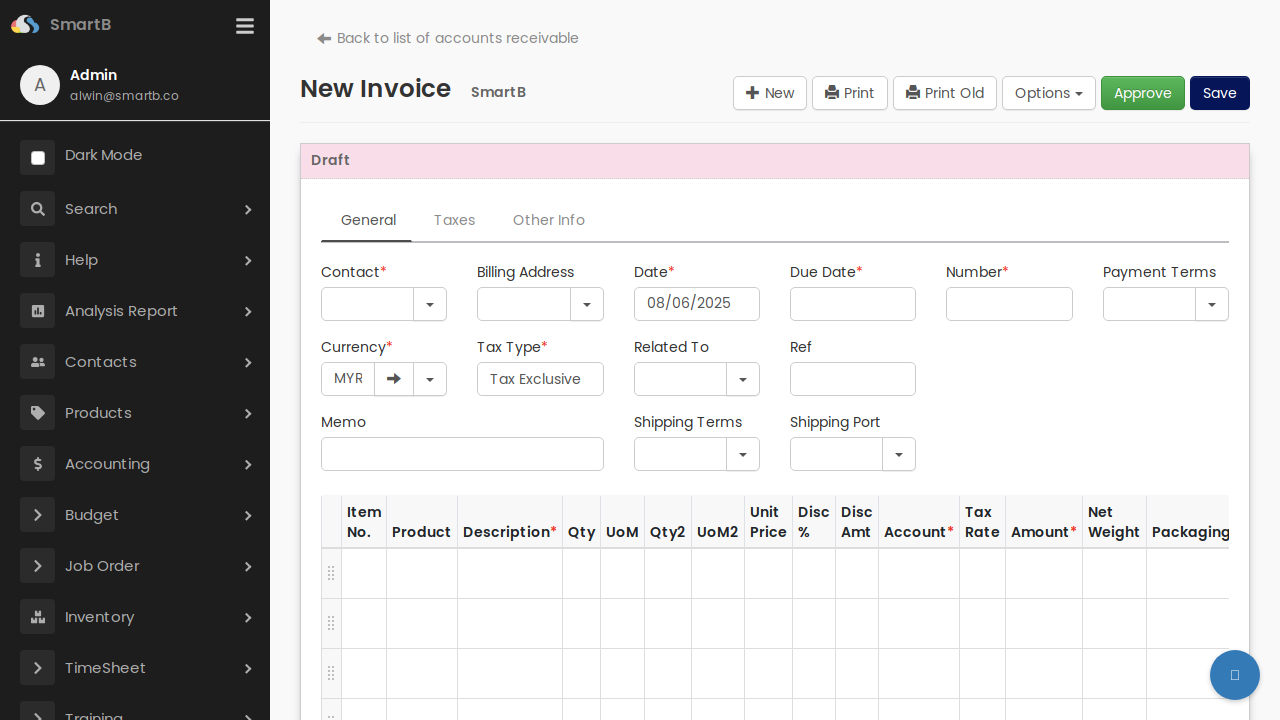
The SmartB invoice form provides a comprehensive interface for creating and managing customer invoices. Below is a screenshot of the invoice creation form:
Key Features
Form Sections
The invoice form is organized into three main tabs:
- General - Contains core invoice information
- Taxes - Tax-related settings and calculations
- Other Info - Additional invoice details
General Tab Fields
- Contact Information
- Contact (dropdown selector)
-
Billing Address
-
Invoice Details
- Date - Invoice creation date
- Due Date - Payment due date
- Number - Invoice number
-
Payment Terms - Payment conditions
-
Financial Settings
- Currency (MYR in this example)
- Tax Type (Tax Exclusive/Inclusive options)
- Related To - Link to related documents
-
Reference number
-
Shipping Information
- Memo field for notes
- Shipping Terms
- Shipping Port
Line Items Grid
The invoice supports multiple line items with the following columns:
- Item No.
- Product
- Description
- Quantity (Qty)
- Unit of Measure (UoM)
- Secondary Quantity (Qty2) and UoM2
- Unit Price
- Discount % and Amount
- Account
- Tax Rate
- Net Amount
- Weight
- Packaging
Action Buttons
- New - Create a new invoice
- Print - Print the current invoice
- Print Old - Print previous version
- Options - Additional options menu
- Approve - Submit for approval
- Save - Save current changes
Invoice Status
The form shows the current status at the top (e.g., "Draft" for new invoices).